The fundamentals of database design are the basis of every strong digital system, no matter if it’s a bank app that manages thousands of transactions or an e-commerce store that manages daily orders or a school management system. If the structure isn’t in place, all but most advanced database platforms fail under stress. That is why understanding tables, relationships, and the ER (Entity-Relationship) model is crucial for anyone entering the world of backend development, database administration, software engineering, data analysis, and system architecture.
In this comprehensive guide in the cinematic style to learn about what the term “database design” actually means what tables do as well as how relationships are connected to your data as well as how ER models help you build the fundamentals of a secure system. The article has been written with a clear and a natural tone, while avoiding unnecessary jargon and retaining the level of detail required to satisfy EEAT standards as well as the latest SEO standards.
What Is Database Design?

The design of a database is the method of creating tables of data that define relationships and ensuring that information flows safely, logically and effectively. A properly designed database avoids duplicates and speeds up queries. It also decreases the amount of storage used and ensures that the system’s capacity is not affected by problems.
A well-designed database can answer three questions that are crucial:
- What data do we need?
- How do we store it?
- What is the way that different pieces of the data communicate?
It’s not just about storage. It’s about improving the way systems function and how users interact with them, and how companies grow.
Why Database Design Matters

Many systems fail not due to programming errors, but rather due to bad data structure. Poor design can lead to:
- Slow queries
- Confusing data
- Repetition of information
- Achieving difficulty in scaling
- The corruption rate is high.
- Security weaknesses
A clean database is and reliable, it is scalable, and is future-proof. It allows developers to upgrade systems without compromising the functionality of existing applications. It provides organizations with confidence that their data is reliable.
Understanding Tables – The Core of Every Database
The table represents the primary element of databases. Imagine it as an Excel spreadsheet: rows represent records, and columns are fields.
Key Elements of a Table
- Fields (Columns): Describe the kind of data.
- records (Rows): Actual records of information.
- Types of Data: Decide if data is text or dates, numbers, etc.
- The primary key: The primary key is a unique number that is used to identify each record.
- Constraints Regulations that govern what information can be saved.
Tables are made to store the same type of entity. For instance:
- A Users table stores user information.
- A Products table stores product details.
- A table for sales table is a database that stores orders.
Combining various types of data in one table can cause confusion and break the rules of design for databases.
Primary Keys – The Identity of a Record
Primary key (PK) is an unique identifier for every row of the table. It guarantees that there are no two records that are identical.
Common keys for primary keys are:
- Auto-increment IDs
- Unique codes
- UUIDs
In the absence of a key primary relationships can’t be established and the data becomes insecure.
The importance of primary keys:
- Prevent duplicate rows
- Facilitate faster search
- Allow table relationships
- Keep data coherent
Each table should have one, no exclusions.
Foreign Keys – Connecting Different Tables
The term “foreign key” (FK) is the field of one table that is a reference directly to the key in another table. This creates a link with the other table.
Example:
- The table called the Orders table could include the users_id field which refers to that table. users table.
- A table of Products table might include the category_id that refers to the Categories table.
Foreign keys ensure that relationships are valid. They help to prevent:
- Orders that do not have customers
- Product without categories
- Records that connect to nothing
Without the foreign keys to database, the data is erratic and insecure.
Types of Relationships in Database Design
There are three kinds of relationships:
1. One-to-One (1:1)
Each record of Table A linked to a single record in Table B.
Example:
- The profile of a user as well as the username
- A person employed and their biometric data
This type of relationship is utilized in cases where data is a part of only one person.
2. One-to-Many (1:N)
Each record from Table A may be linked to several records in Table B.
It is possibly the most well-known relationship.
Examples:
- One user could have many orders
- An author could write a variety of books.
- A category may include a number of items
This design is flexible and reliable for real-world applications.
3. Many-to-Many (M:N)
The multiple records of Table A may be linked to several records in Table B.
Examples:
- Students who are enrolled in numerous courses
- Products with multiple tags
- Doctors treating multiple patients
To illustrate this connection, a second table–known as a bridge or junction table –is employed.
Normalization – Keeping Data Clean and Efficient
The process involves arranging data in order to minimize duplication and increase efficiency.
The most common forms are:
- 1NF: No repeating groups, atomic values
- 2NF: Remove partial dependencies
- 3NF: Remove transitive dependencies
- BCNF An even more strict version of 3NF
What is normalization?
- Reduces storage
- Enhances the performance of inserts and updates
- Reduces the risk of redundancy
- Enhances data integrity
Yet, over-normalization can cause slow reading So a more well-balanced approach is recommended.
Entity-Relationship (ER) Model – The Blueprint of a Database
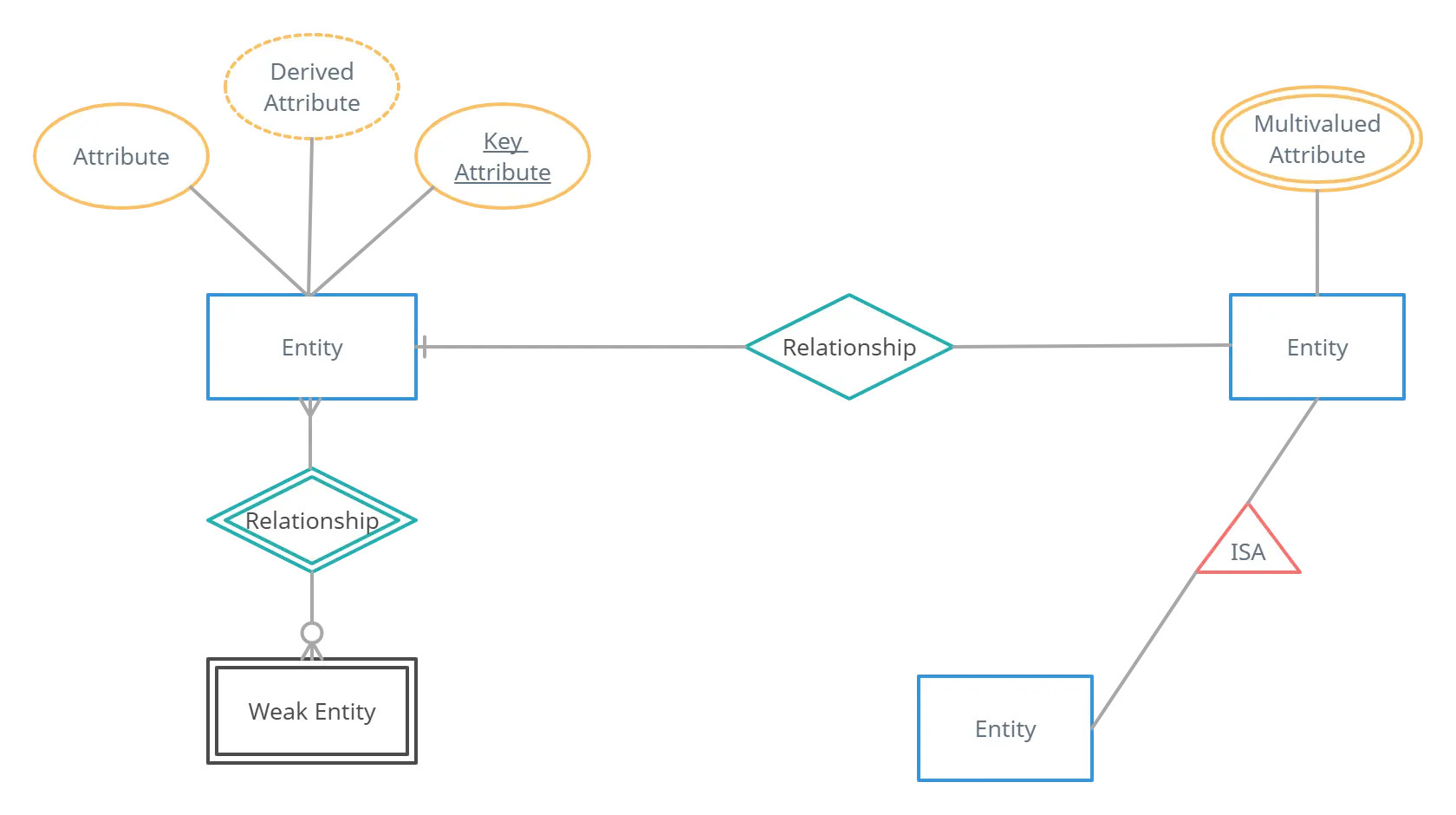
The ER model is an illustration of the structure of your database. It aids you in planning prior to creating tables.
It comprises:
- Entities (tables)
- Attributes (columns)
- Relations (connections to tables)
An ER model is essentially an illustration of what data exists, how it moves through the system, and how it all connects together.
Components of an ER Diagram
1. Entities
These are objects which are represented by tables.
Examples:
- User
- Product
- Order
2. Attributes
These are the fields within every entity.
Examples:
- Username
- Price
- created_at
3. Relationships
They are the links between entities, based on foreign and primary keys.
The ER diagram clearly illustrates:
- Cardinality
- Type of relationship
- Links with optional or compulsory content
Why ER Modeling Is Important
ER modeling can help:
- Define the requirements of the system
- Reduce design mistakes
- Plan efficient database structures
- Design clearly and communicate it to teams.
- Avoid conflicts during development
If you don’t have the ER model, you will end creating tables in a blind fashion and could require major changes in the future.
Common Mistakes in Database Design
Avoid these mistakes:
1. Multiple values can be stored in one field
Example: Saving several phone numbers in a single column.
2. Not using primary keys that are appropriate
It can result in messy and inconsistent data. This can lead to messy and inconsistent.
3. Making use of the wrong data types
It slows down performance and takes up space.
4. Missing foreign keys
Broken relationships can lead to inaccurate data.
5. Over-normalizing the structure
The system creates too many tables, and complicated queries.
6. Insufficient planning using an ER diagram
This can lead to major refactoring later on.
Best Practices for Designing a Database
Here are the principles that are used by architects who are professionals:
- Learn about the real-world requirements
- Group related data into entities
- Make sure you use the correct primary keys
- Define clear relationships
- Normalize your the balance
- Choose appropriate data types
- Add constraints for data integrity
- Document your design
- Create an ER model prior to coding
- Optimize your site for both readings and write-ups
This makes your database system-friendly and future-proof.
Database Design for Scalable Modern Applications
Modern systems typically serve millions or thousands of users at once. Your design must support scalability.
The most important things to think about:
- Indexing strategy
- Partitioning and sharding
- Handling high-volume writes
- Balance of read and write
- Caching techniques
- Enhancing relationships
- Refrain from joining in unnecessary ways
A great designer does not focus solely on storage but on the performance of the system and its real-world use.
Logical vs Physical Design
The design of databases has two major phases:
Logical Design
- Identifies entities
- Defines the attributes
- Establishes relationships
- Make use of ER diagrams
- The focus is on the conceptual structure
Design for logical logic does not require a database platform.
Physical Design
- Creates tables that actually exist
- Selects indexes
- Defines data types
- Applies limitations
- Optimizes storage
Physical design is dependent upon the system such as:
- MySQL
- PostgreSQL
- SQL Server
- Oracle
- MariaDB
Both stages need to be in sync for the system to run efficiently.
How To Start Designing a Database (Step-by-Step)
Step 1 – Understand System Requirements
Speak to the stakeholders and collect the complete information.
Step 2 – Identify Entities
Group information into logical categories.
Step 3 – List Attributes
Define the fields required for each entity.
Step 4 – Define Primary Keys
Choose unique identifiers.
Step 5 – Create Relationships
Connect entities using foreign keys.
Step 6 – Normalize
Clean up the data structure.
Step 7 – Draw an ER Diagram
Visualize the entire system.
Step 8 – Finalize Physical Design
Create the database using SQL.
The result is an uncluttered and robust architecture.
Conclusion
Fundamentals of database design are vital for any project, large or small. Knowing the basics of tables, relationships and ER models will allow you with the tools to design systems that are quick secure, safe, and adaptable. A reliable database isn’t built by accident, it’s created with a purpose, planned with precision as well as executed with accuracy.
If you’re just starting out or a seasoned developer, knowing these fundamentals gives an ability to create structures that can stand the tests of time, manage thousands of files, as well as support the rapid growth of apps.