

Angular is one of the most robust frameworks for building modern web applications, but its true potential is realized only when your app is structured effectively. The way you organize modules, components, and services determines whether your application remains maintainable, scalable, and efficient, especially as it grows in size.
In this guide, we’ll explore Angular modules, application architecture, and best practices for organizing your app. You’ll understand how to structure your project for better performance, maintainability, and developer collaboration.
What Is Angular Architecture?

Angular architecture is the structured approach to building applications using components, services, modules, and routing. Unlike simple libraries, Angular provides a complete ecosystem to manage the UI, state, business logic, and navigation in one coherent framework.
Good architecture ensures:
- Clean and readable code
- Efficient management of components and services
- Easy scaling for larger applications
- Smooth collaboration across teams
Without proper architecture, applications become difficult to maintain, prone to bugs, and inefficient as they grow.
Understanding Angular Modules
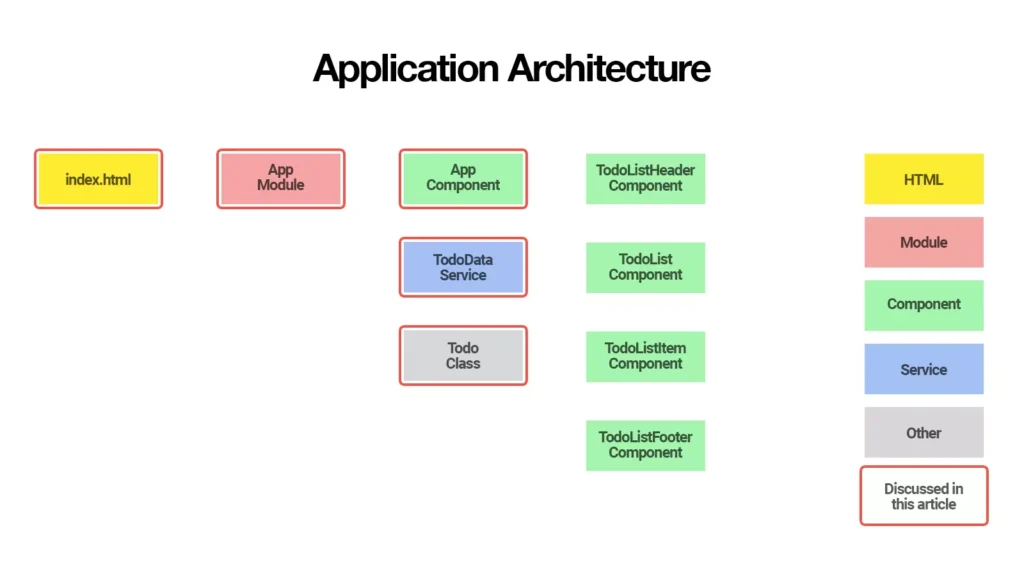
Modules are the core building blocks of Angular applications. They group related functionalities together, making the app modular, maintainable, and scalable.
Types of Angular Modules
- Root Module (AppModule):
The main module that bootstraps the application. Every Angular app has exactly one root module. - Feature Modules:
Organize specific features like user management, dashboard, or products. They make applications modular and easier to maintain. - Shared Module:
Contains reusable components, pipes, and directives used across multiple modules. Promotes code reusability. - Core Module:
Holds singleton services and global providers. Ensures services are not accidentally duplicated. - Routing Modules:
Manage application navigation. Each feature can have its own routing module for cleaner separation.
Modules make your application:
- Reusable
- Maintainable
- Lazy-loadable for better performance
- Easy to scale
Folder Structure Best Practices
A clean folder structure helps developers understand the app at a glance. A recommended structure:
- Core: Singleton services, guards, interceptors, and global configurations.
- Shared: Reusable UI components, pipes, and directives.
- Features: Feature-specific modules, components, services, and routing.
This separation ensures clarity and prevents clutter.
Components in Angular Architecture
Components are the building blocks of the UI. Each component should focus on a single responsibility:
- Presenting a part of the UI
- Handling interaction with the user
- Communicating with services for data
Smart vs. Dumb Components
- Smart Components: Manage data, services, and business logic.
- Dumb Components: Only display data and emit events.
Separating logic and presentation ensures maintainable and reusable code.
Services and Business Logic
Services store business logic, data management, and communication between components. By keeping components lightweight and focused on UI, the application becomes easier to test, maintain, and scale.
Routing and Navigation
Routing connects components and modules to create a navigable application. A well-structured routing system:
- Uses feature-specific routing modules
- Supports lazy loading
- Implements guards for security
- Maintains clear navigation logic
Proper routing keeps applications scalable and organized.
State Management
Managing state efficiently is crucial for large applications. Angular provides several options:
- Component-level state for small apps
- Service-based state for shared data
- Global state using external libraries or built-in solutions
A clean architecture ensures state is predictable, centralized, and manageable.
Lazy Loading for Performance
Lazy loading allows feature modules to load only when needed, reducing the initial load time and improving app performance. This is especially useful for large applications with many modules and heavy components.
Best Practices for Angular Architecture
- Organize features into separate modules.
- Keep reusable components in a shared module.
- Use the core module for singleton services.
- Apply lazy loading for heavy modules.
- Separate smart and dumb components.
- Keep folder structure clean and logical.
- Use proper naming conventions for clarity.
- Avoid circular dependencies between modules.
- Keep routing modules organized per feature.
- Document your architecture and code for collaboration.
Common Mistakes to Avoid
- Overloading the root module with all features
- Placing business logic inside components
- Creating oversized components
- Ignoring lazy loading for large modules
- Mixing unrelated features in a single module
- Using inconsistent folder structure or naming
- Failing to separate shared and core functionality
Avoiding these mistakes ensures your Angular app remains scalable and maintainable.
Conclusion
Angular modules and architecture are essential for building high-quality, maintainable, and scalable applications. Organizing your app correctly using feature modules, shared modules, core modules, and proper folder structure not only improves performance but also makes your code cleaner and easier to maintain.
By following best practices and separating concerns, your Angular applications will be efficient, scalable, and ready for future growth, whether it’s a small project or a large enterprise application.


